AI Knowledge Base · AI Cloud Platforms
Every AI cloud, one team that knows them
Hyperscalers for managed models and enterprise controls, GPU clouds for raw capacity, marketplaces for the cheapest hours. The Workstation team designs, secures and runs AI across all of them, and alongside the hardware you own.
Hyperscalers

Amazon Web Services
Amazon Bedrock, SageMaker AI and the broadest GPU and custom-silicon range.
Read the guide →
Google Cloud
Vertex AI, Gemini and TPUs alongside NVIDIA GPUs.
Read the guide →
Microsoft Azure
Azure OpenAI and AI Foundry, wired into Microsoft 365 and Entra ID.
Read the guide →
Oracle Cloud Infrastructure
Bare-metal GPU superclusters and OCI Generative AI.
Read the guide →GPU clouds

CoreWeave
A Kubernetes-native cloud built for large GPU clusters.
Read the guide →Lambda
Simple, fast GPU instances and clusters for AI teams.
Read the guide →Nebius
A full-stack AI cloud with GPU clusters and managed inference.
Read the guide →
DigitalOcean
Developer-friendly GPU Droplets and an agent platform.
Read the guide →GPU marketplaces
Also supported: Together AI, Fireworks AI, Groq, Hugging Face Inference Endpoints, Replicate, Crusoe, Hyperstack, Scaleway and OVHcloud.
How they compare
Most organisations use more than one: a hyperscaler for managed models and governance, a GPU cloud for training or heavy inference, and their own hardware for sensitive or steady workloads.
| Type | Strengths | Trade-offs | Use it for |
|---|---|---|---|
| Hyperscalers (AWS, Google Cloud, Azure, Oracle) | Managed models, identity, compliance, global regions | Higher GPU prices, quotas to manage | Production APIs, regulated data, managed agents |
| GPU clouds (CoreWeave, Lambda, Nebius, DigitalOcean) | Newest GPUs, large clusters, simpler pricing | Fewer managed services | Training, fine-tuning, high-volume inference |
| GPU marketplaces (Vast.ai, RunPod) | Lowest cost per GPU-hour, fast to start | Variable reliability and trust | Experiments, batch jobs, scale-to-zero endpoints |
| Your own Workstation hardware | Fixed cost, full control, data stays in your building | Capital outlay, capacity planning | Sensitive data, steady workloads, development |
Scaling AI at large scale with Amazon Bedrock
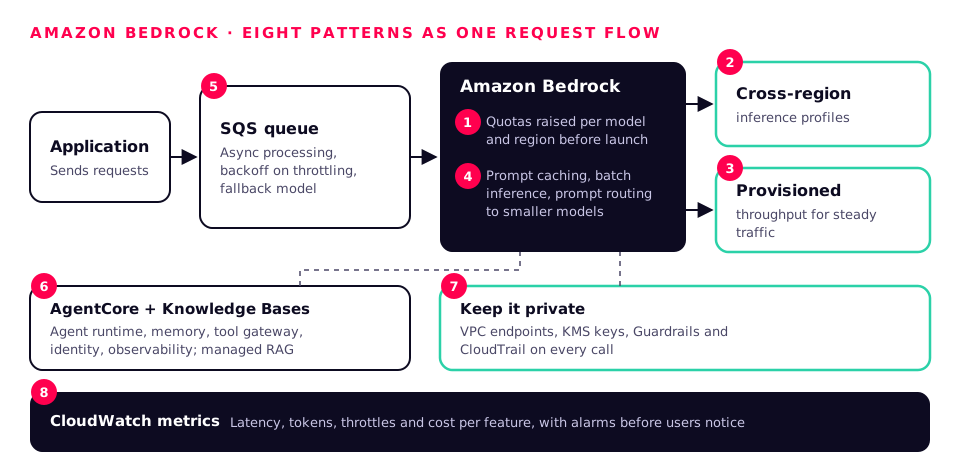
Bedrock removes the GPU problem, but large-scale traffic still needs designing. These are the patterns we use for high-volume Bedrock workloads.
- 1
Plan quotas first
Model tokens-per-minute and requests-per-minute against peak traffic and raise quotas before launch, per model and per region.
- 2
Spread the load
Cross-region inference profiles route requests across regions automatically when one is busy.
- 3
Guarantee capacity
Provisioned throughput for steady, latency-sensitive traffic; on-demand for the rest.
- 4
Cut cost per request
Prompt caching for repeated context, batch inference for offline work, and prompt routing to send simple requests to smaller models.
- 5
Absorb spikes
Queue requests (SQS) and process them asynchronously, with exponential backoff on throttling and a fallback model.
- 6
Run agents properly
Bedrock AgentCore for agent runtime, memory, tool gateway, identity and observability; Knowledge Bases for managed RAG.
- 7
Keep it private
VPC endpoints, KMS keys, Guardrails and CloudTrail on every call.
- 8
Measure everything
CloudWatch metrics for latency, tokens, throttles and cost per feature, with alarms before users notice.
CI/CD for LLMs, agents and data in the cloud
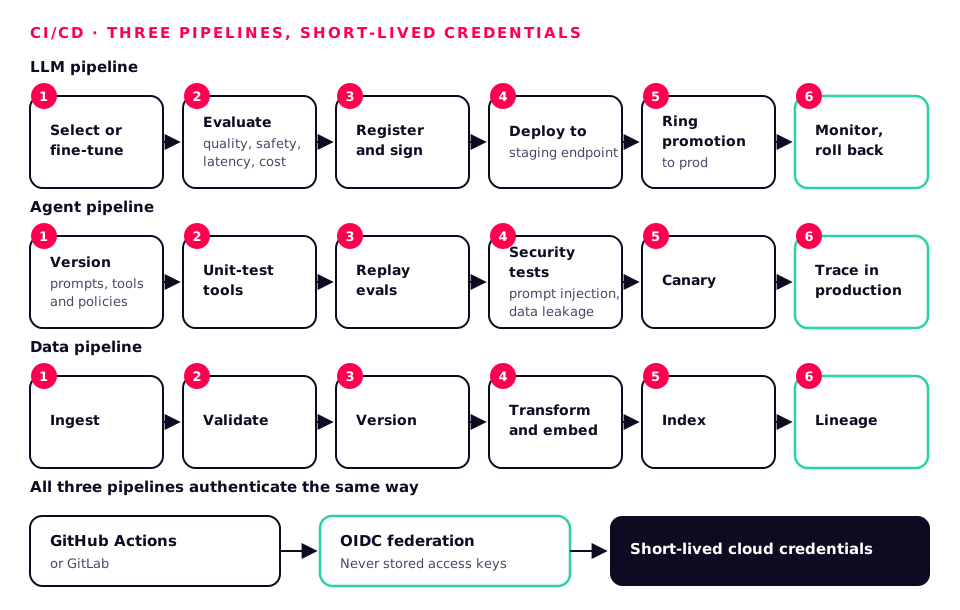
The same discipline as on-premises: everything versioned, tested, signed and promoted through rings, with infrastructure as code so every environment is reproducible.
LLM pipeline
- Select or fine-tune
- Evaluate (quality, safety, latency, cost)
- Register and sign
- Deploy to staging endpoint
- Ring promotion to prod
- Monitor and roll back
Bedrock, Vertex AI or Azure AI Foundry evaluation; SageMaker or Vertex pipelines; MLflow registry; Terraform or OpenTofu; Ring Promoter for health-checked releases.
Agent pipeline
- Version prompts, tools and policies
- Unit-test tools
- Replay evals
- Security tests (prompt injection, data leakage)
- Canary
- Trace in production
AgentCore, Agent Engine or Foundry Agent Service; OpenTelemetry tracing; evaluation suites in CI.
Data pipeline
- Ingest
- Validate
- Version
- Transform and embed
- Index
- Lineage
AWS Glue, Dataflow or Data Factory; Airflow or Dagster; Bedrock Knowledge Bases, Vertex AI Search or Azure AI Search; OpenLineage.
Pipelines run with short-lived cloud credentials through OIDC federation from GitHub Actions or GitLab, never stored access keys.
Securing LLM and agent APIs
An LLM endpoint is an API that can be talked into things. We secure it like any critical API, then add the controls specific to AI.
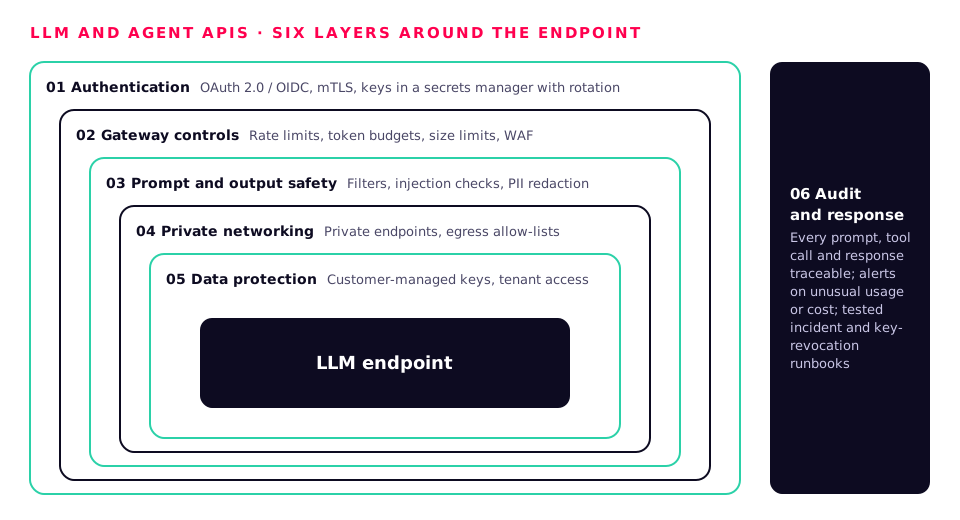
01
Authentication
- OAuth 2.0 / OIDC for users and services
- mTLS between services
- No static API keys in code; keys in a secrets manager with rotation
02
Gateway controls
- Rate limits and token budgets per user and tenant
- Request size and context limits
- WAF in front of public endpoints
03
Prompt and output safety
- Guardrails, Model Armor or Content Safety on input and output
- Prompt-injection detection on retrieved documents and tool results
- PII redaction before logging
04
Private networking
- Private endpoints for model APIs
- Egress allow-lists for agents and tools
- No public IPs on model servers
05
Data protection
- Customer-managed keys
- Tenant and document-level access in retrieval
- Data residency in UK or EU regions where required
06
Audit and response
- Every prompt, tool call and response traceable
- Alerts on unusual usage or cost
- Tested incident and key-revocation runbooks
The AI agent harness
An agent is a model plus a harness: the code that decides what it may see, which tools it may call, and when a human must approve. The harness is where safety and reliability live.
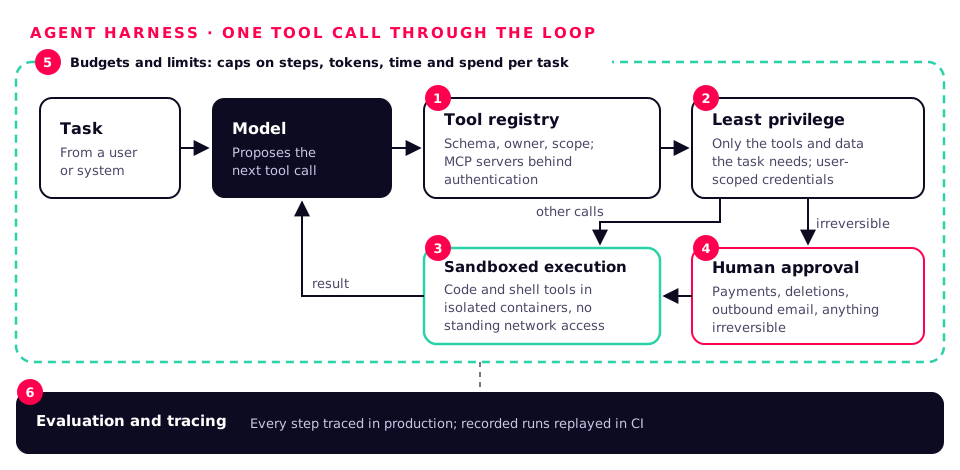
Tool registry
Every tool declared with a schema, an owner and a permission scope; MCP servers behind authentication.
Least privilege
Each agent gets only the tools and data its task needs, with credentials scoped to the user it acts for.
Sandboxed execution
Code and shell tools run in isolated containers with no standing network access.
Human in the loop
Approvals for payments, deletions, outbound emails and anything irreversible.
Budgets and limits
Caps on steps, tokens, time and spend per task, with clean failure when hit.
Evaluation and tracing
Recorded runs replayed in CI, and every step traced in production for debugging and audit.
Identity and authentication for AI
Agents act on behalf of people and systems, so they need proper identities, not shared keys.
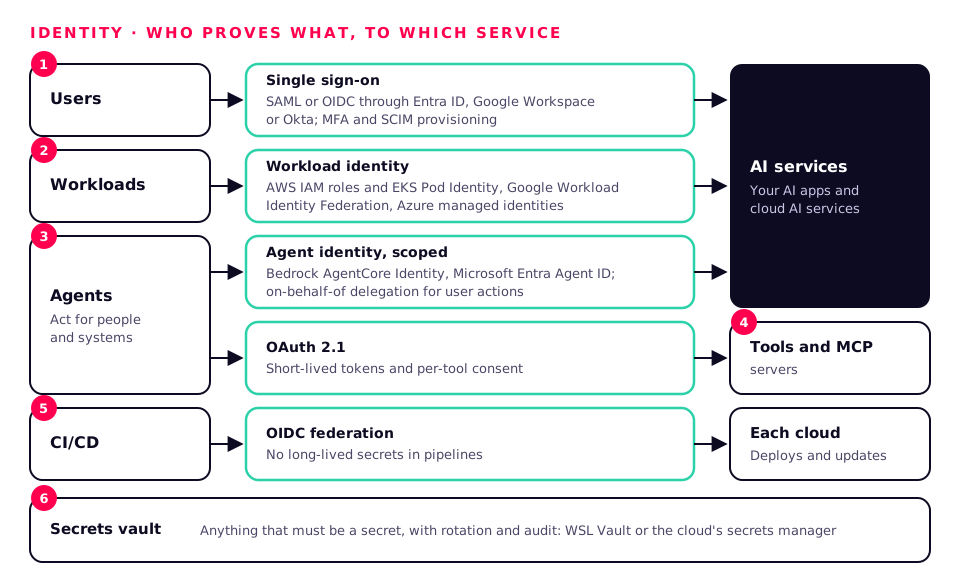
Users
Single sign-on through your identity provider (Entra ID, Google Workspace, Okta) with SAML or OIDC, MFA and SCIM provisioning.
Workloads
Cloud-native workload identity: AWS IAM roles and EKS Pod Identity, Google Workload Identity Federation, Azure managed identities.
एजेंट
Agent identities with their own scoped permissions, such as Bedrock AgentCore Identity and Microsoft Entra Agent ID, with on-behalf-of delegation for user actions.
Tools and MCP
OAuth 2.1 for MCP servers and third-party tools, short-lived tokens and per-tool consent.
CI/CD
OIDC federation from your CI to each cloud, so pipelines hold no long-lived secrets.
Secrets
A vault for anything that must be a secret, with rotation and audit, such as our WSL Vault or the cloud's own secrets manager.
Optimising AI workloads in the cloud
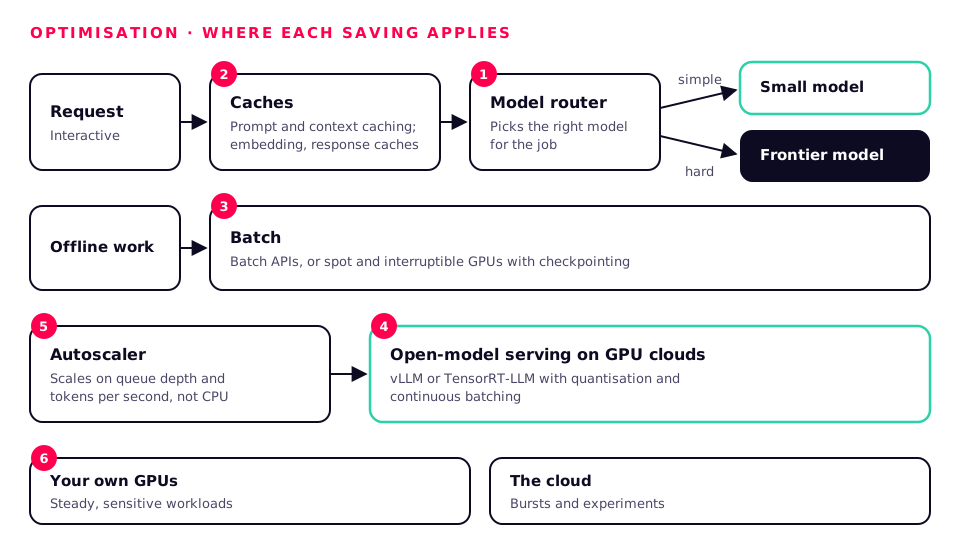
- Right model for the job: route simple requests to small models and save frontier models for hard ones.
- Cache everything you can: prompt and context caching, embedding caches and response caches for repeated questions.
- Batch offline work: batch APIs and spot or interruptible GPUs with checkpointing.
- Serve open models efficiently: vLLM or TensorRT-LLM with quantisation and continuous batching on GPU clouds.
- Autoscale on the right signal: queue depth and tokens per second, not CPU.
- Hybrid by design: steady, sensitive workloads on your own GPUs, bursts and experiments in the cloud.
Supported by the Workstation team
We are platform-neutral. We help you choose, then design, secure, deploy and run AI on any of these clouds, alongside your own hardware.
- Architecture and platform selection, including cost modelling
- Landing zones with identity, networking and encryption
- Bedrock, Vertex AI and Azure AI Foundry solutions and agents
- GPU cluster builds on GPU clouds
- CI/CD, evaluation and ring-based releases
- Security reviews of LLM and agent APIs
- Hybrid set-ups with on-premises Workstation hardware
Logos are trademarks of their respective owners, used only to identify each platform, and come from Wikimedia Commons. Diagrams by the Workstation team.