AI Knowledge Base · Linux OS
Linux, tuned for AI
Every AI system we ship runs on Linux. This guide covers the distributions the Workstation team supports, how we harden them, the kernel and driver settings that matter for GPUs, how we run them under Kubernetes and Docker, how LLM APIs scale on top, and the CI/CD pipelines that carry models, agents and data safely to production.
- Ubuntu
- Red Hat Enterprise Linux
- SUSE Linux
- Alpine Linux
- Debian
- Rocky & AlmaLinux
Choosing a distribution
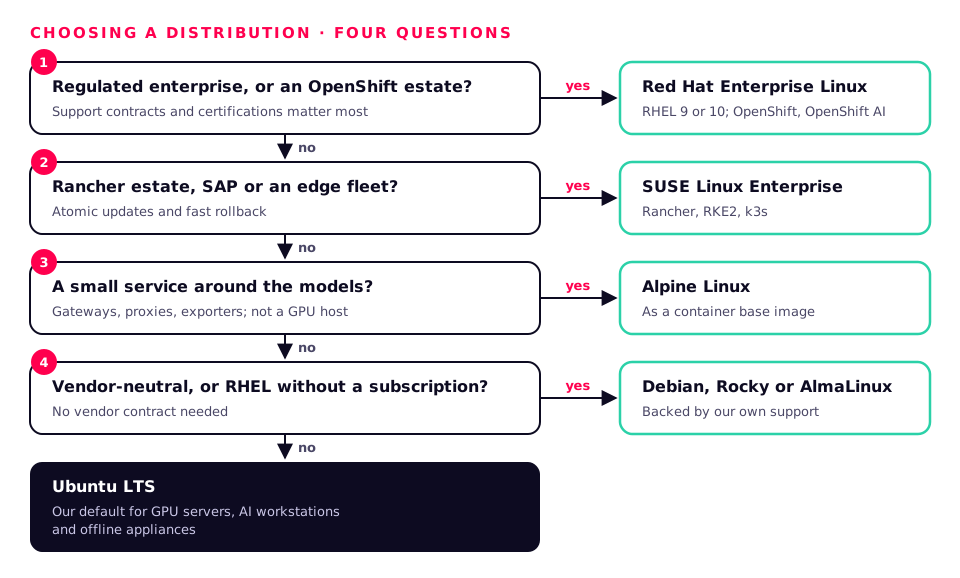
There is no single best Linux for AI. The right choice depends on where it runs, who supports it and what else it has to fit into. This is how we usually decide.
| Distribution | इनके लिए सर्वोत्तम | GPU & CUDA | Kubernetes | Lifecycle |
|---|---|---|---|---|
| Ubuntu LTS | GPU servers, workstations, most AI teams | First-class: NVIDIA builds and tests here first; signed drivers | Canonical Kubernetes, MicroK8s, k3s, RKE2 | 5 years, 10+ with Ubuntu Pro |
| Red Hat Enterprise Linux | Regulated enterprises, OpenShift estates | NVIDIA CUDA repository and driver streams; RHEL AI | OpenShift, OpenShift AI | 10 years, plus extended support |
| SUSE Linux Enterprise | Rancher estates, SAP and edge fleets | Signed NVIDIA open kernel driver packages; SUSE AI | Rancher, RKE2, k3s | Long lifecycle with LTSS |
| Alpine Linux | Minimal containers, gateways and edge services | Not for GPU hosts (musl, no CUDA) | As a container base image | About 2 years per release |
| Debian | Stable, vendor-neutral servers and labs | NVIDIA drivers in non-free; CUDA repository | k3s, kubeadm, RKE2 | About 5 years with LTS |
| Rocky & AlmaLinux | RHEL-compatible without a subscription | Same packages as RHEL | kubeadm, RKE2, k3s, OKD | About 10 years |
The distributions we support

Ubuntu
The default for GPU servers and AI workstations.
Most of the AI ecosystem is built and tested on Ubuntu first. NVIDIA's NGC containers, CUDA documentation and many framework installers assume it, which means fewer surprises when a new GPU, driver or model release lands.
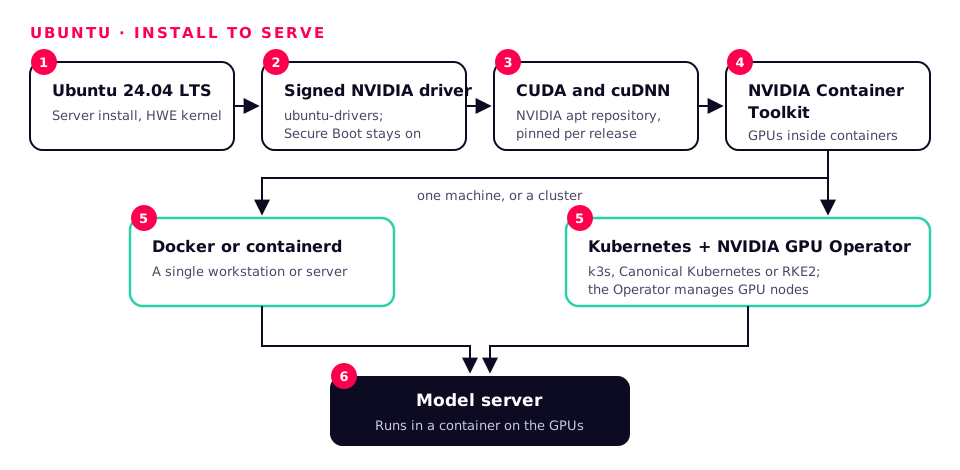
Versions we deploy: Ubuntu 24.04 LTS (Server and Desktop), 22.04 LTS for existing estates
GPU, CUDA and AI stack
- ubuntu-drivers installs Canonical-signed NVIDIA kernel modules, so UEFI Secure Boot stays on without enrolling your own key.
- CUDA, cuDNN and the NVIDIA Container Toolkit from NVIDIA's apt repositories, pinned per release.
- HWE kernels bring support for the newest CPUs, GPUs and NICs to an LTS release.
How we tune it for AI
- Server installs, minimal packages, snaps held or removed on appliances.
- Performance CPU governor, NUMA-aware placement and persistence mode for the GPUs (see the kernel section).
- Unattended security updates scheduled in a maintenance window, or offline update bundles for air-gapped sites.
Kubernetes and containers
- Docker or containerd with the NVIDIA Container Toolkit.
- k3s for single-node and edge, Canonical Kubernetes or RKE2 for clusters, the NVIDIA GPU Operator on top.
सुरक्षा
- Ubuntu Pro adds Livepatch, FIPS 140 modules, expanded security maintenance and the Ubuntu Security Guide for CIS and DISA-STIG hardening.
- AppArmor enforcing, with profiles for the services we run.
Our view: Our default for GPU servers, AI workstations and offline appliances, unless an estate already standardises on something else.

Red Hat Enterprise Linux
For regulated enterprises and OpenShift estates.
RHEL brings a ten-year lifecycle, certified hardware and a support contract that procurement and auditors recognise. Red Hat's AI portfolio, RHEL AI, OpenShift AI and the vLLM-based Red Hat AI Inference Server, builds on it.
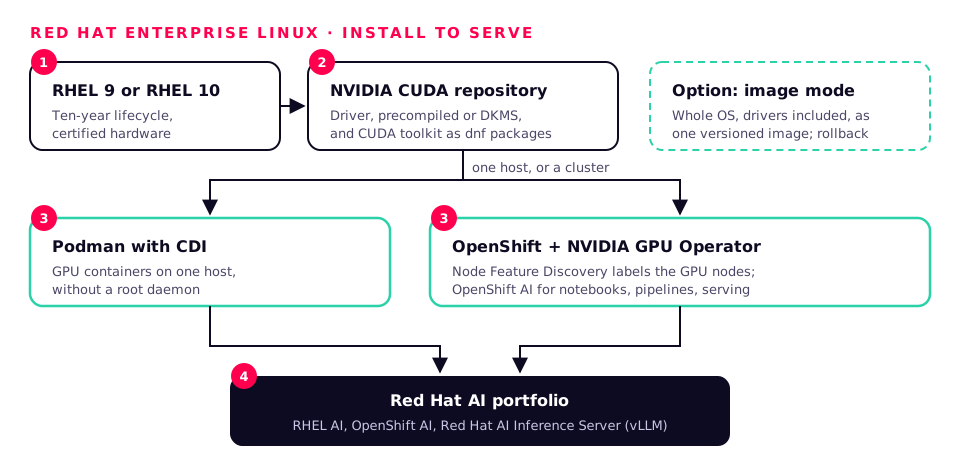
Versions we deploy: RHEL 9 and RHEL 10
GPU, CUDA and AI stack
- NVIDIA's CUDA repository for RHEL provides the driver (precompiled or DKMS) and the CUDA toolkit as dnf packages.
- Podman with CDI (Container Device Interface) for GPU containers without a root daemon.
- Image mode (bootable containers) lets the whole OS, drivers included, ship and roll back as one versioned image.
How we tune it for AI
- tuned profiles such as throughput-performance or accelerator-performance as the starting point, then per-workload changes.
- NUMA, IRQ affinity and huge page settings managed as code.
Kubernetes and containers
- OpenShift with the NVIDIA GPU Operator and Node Feature Discovery; OpenShift AI for notebooks, pipelines and model serving.
सुरक्षा
- SELinux enforcing by default, FIPS mode, and OpenSCAP with the SCAP Security Guide for CIS and STIG profiles.
- kpatch live kernel patching for zero-downtime security fixes.
Our view: The right choice where support contracts, certifications or an existing OpenShift platform matter more than having the newest packages.

SUSE Linux
For Rancher-managed fleets, SAP and the edge.
SUSE pairs an enterprise Linux with Rancher, one of the most widely used ways to manage many Kubernetes clusters, and with SUSE AI for running private AI on that platform. Its snapshot and transactional-update tooling makes rollbacks routine.
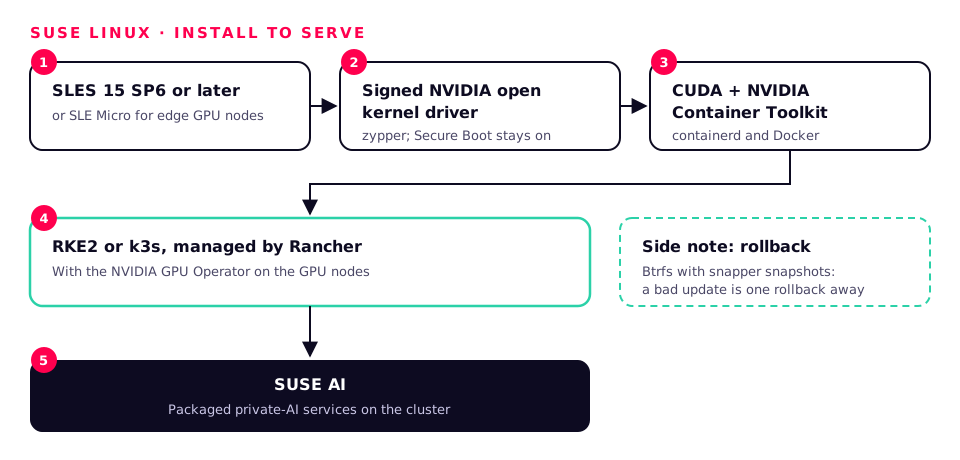
Versions we deploy: SUSE Linux Enterprise Server 15 SP6 and later, SLE Micro for edge, openSUSE Leap for labs
GPU, CUDA and AI stack
- SUSE packages NVIDIA's open GPU kernel modules signed for Secure Boot, installable with zypper.
- CUDA from NVIDIA's SUSE repository; the NVIDIA Container Toolkit for containerd and Docker.
How we tune it for AI
- Btrfs with snapper snapshots, so a bad driver or kernel update is one rollback away.
- SLE Micro's read-only, transactional OS for edge GPU nodes that must update atomically.
Kubernetes and containers
- RKE2 or k3s managed by Rancher, with the NVIDIA GPU Operator; SUSE AI for packaged private-AI services.
सुरक्षा
- Mandatory access control (AppArmor or SELinux), FIPS-certified modules, OpenSCAP hardening profiles.
- SUSE Live Patching for kernel fixes without a reboot.
Our view: Best where Rancher already runs the clusters, or for edge fleets that need atomic updates and fast rollback.

Alpine Linux
Tiny, fast and hardened, for containers rather than GPU hosts.
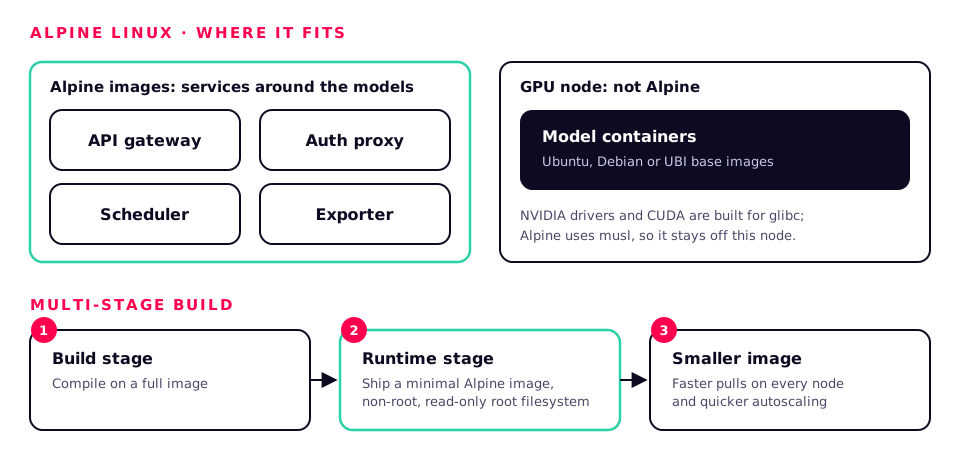
Alpine's base image is a few megabytes, built on musl libc and BusyBox with a hardened toolchain. That makes it excellent for the small services around an AI system, and a poor fit for the GPU work itself.
Versions we deploy: Current Alpine stable releases, as container base images
GPU, CUDA and AI stack
- NVIDIA drivers and CUDA are built for glibc, and PyTorch publishes no musl wheels, so GPU and most training images belong on Ubuntu, Debian or UBI bases.
- Ideal for API gateways, auth proxies, schedulers, exporters and lightweight CPU inference with compiled runtimes.
How we tune it for AI
- Multi-stage builds that compile on a full image and ship a minimal Alpine runtime.
- Smaller images mean faster pulls on every node and quicker autoscaling.
Kubernetes and containers
- A base image for sidecars, init containers and edge services in any Kubernetes distribution.
सुरक्षा
- A small package set means a small attack surface and short vulnerability scan reports.
- Run as non-root with a read-only root filesystem.
Our view: Use it for the services around your models, not for the GPU nodes or the model containers themselves.



Debian, Rocky & AlmaLinux
Community distributions we support in production.
Debian is the stable, vendor-neutral base underneath Ubuntu and many appliances. Rocky Linux and AlmaLinux are binary-compatible with RHEL, for teams that want the RHEL ecosystem without a subscription.
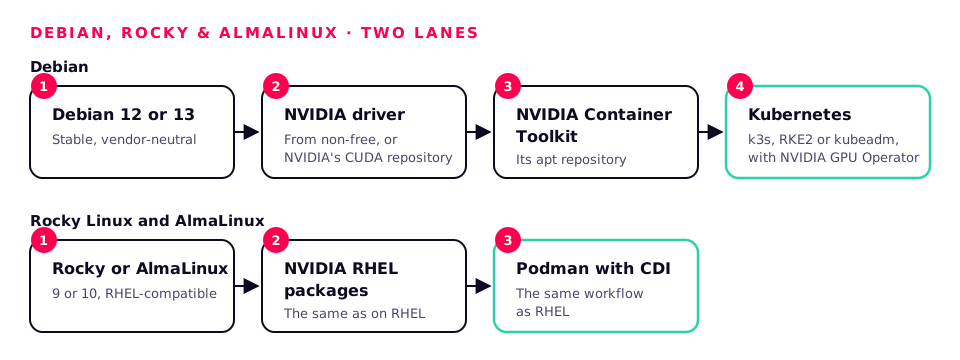
Versions we deploy: Debian 12 and 13; Rocky Linux and AlmaLinux 9 and 10
GPU, CUDA and AI stack
- Debian: NVIDIA drivers from the non-free repository or NVIDIA's CUDA repository; the NVIDIA Container Toolkit's apt repository.
- Rocky and AlmaLinux: the same NVIDIA RHEL packages and Podman CDI workflow as RHEL.
How we tune it for AI
- The same kernel, NUMA and storage settings as their commercial cousins, applied with Ansible.
- Debian also underpins Proxmox VE, which we use for GPU passthrough labs.
Kubernetes and containers
- k3s, RKE2 or kubeadm clusters with the NVIDIA GPU Operator.
सुरक्षा
- CIS benchmarks via OpenSCAP, AppArmor on Debian and SELinux on Rocky and AlmaLinux, with automated security updates.
Our view: Solid, cost-effective choices when you don't need a vendor contract, backed by our own support.
Kernel & OS optimisations for AI workloads
GPUs only run fast when the host keeps them fed. These are the settings we check on every AI system, then tune against the customer's own workload. None of them is universal: we measure before and after.
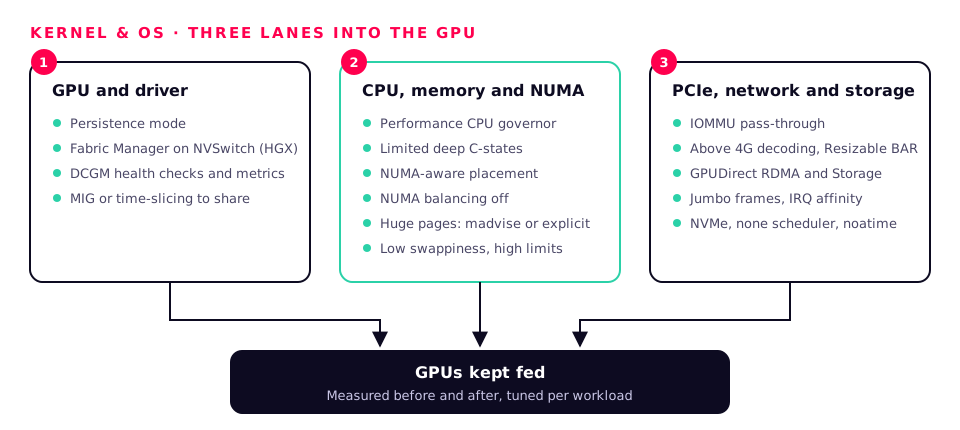
GPU and driver
- Persistence mode (nvidia-persistenced) so the driver stays loaded and the first request isn't slow.
- NVIDIA Fabric Manager on NVSwitch systems (HGX): without it the GPUs will not initialise for CUDA.
- DCGM for health checks, diagnostics and per-GPU metrics.
- MIG partitions or time-slicing when many small models share one large GPU.
CPU, memory and NUMA
- Performance CPU governor and limited deep C-states on latency-sensitive inference hosts.
- NUMA-aware placement: each GPU's work pinned to the CPU socket and memory nearest it (nvidia-smi topo -m shows the map).
- Automatic NUMA balancing off on dedicated GPU hosts, so pages don't migrate under load.
- Transparent huge pages at madvise by default; explicit huge pages for RDMA and DPDK workloads.
- Low swappiness and generous memlock and file-descriptor limits for data loaders and RDMA.
PCIe, network and storage
- IOMMU in pass-through mode and Above 4G decoding / Resizable BAR in firmware.
- GPUDirect RDMA (nvidia-peermem) and GPUDirect Storage (nvidia-fs) so data skips the CPU.
- Jumbo frames end to end on storage and RoCE fabrics, with IRQ affinity spread across cores.
- NVMe with the none scheduler, XFS or ext4 with noatime for datasets and checkpoints.
A starting point (tested per workload, never copied blind)
# /etc/sysctl.d/90-ai.conf
kernel.numa_balancing = 0
vm.swappiness = 10
vm.max_map_count = 1048576
net.core.rmem_max = 268435456
net.core.wmem_max = 268435456

# kernel command line (GRUB)
iommu=pt transparent_hugepage=madvise

# services
systemctl enable --now nvidia-persistenced
systemctl enable --now nvidia-fabricmanager   # NVSwitch (HGX) systems
cpupower frequency-set -g performance
Kubernetes & Docker for AI
Most of the AI systems we build run in containers, from a single workstation running Docker to multi-node GPU clusters. The building blocks are the same on every distribution.
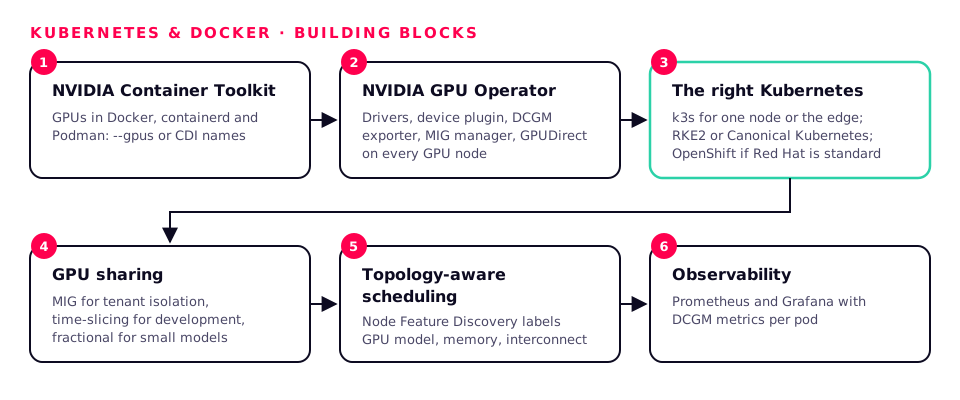
NVIDIA Container Toolkit
Gives Docker, containerd and Podman access to the GPUs, through the --gpus flag or CDI device names.
NVIDIA GPU Operator
Installs and manages drivers, the device plugin, DCGM exporter, MIG manager and GPUDirect components on every Kubernetes GPU node.
The right Kubernetes
k3s for one node or the edge, RKE2 or Canonical Kubernetes for clusters, OpenShift where Red Hat is the standard.
GPU sharing
MIG for hard isolation between tenants, time-slicing for development, and fractional scheduling for many small models.
Topology-aware scheduling
Node Feature Discovery labels GPU model, memory and interconnect, so large jobs land on the nodes that suit them.
Observability
Prometheus and Grafana with DCGM metrics: GPU utilisation, memory, temperature, power and errors per pod.
Native LLM APIs and how they scale
We serve models behind OpenAI-compatible APIs, so applications don't care which model or engine sits behind them. Scaling then happens in four directions.
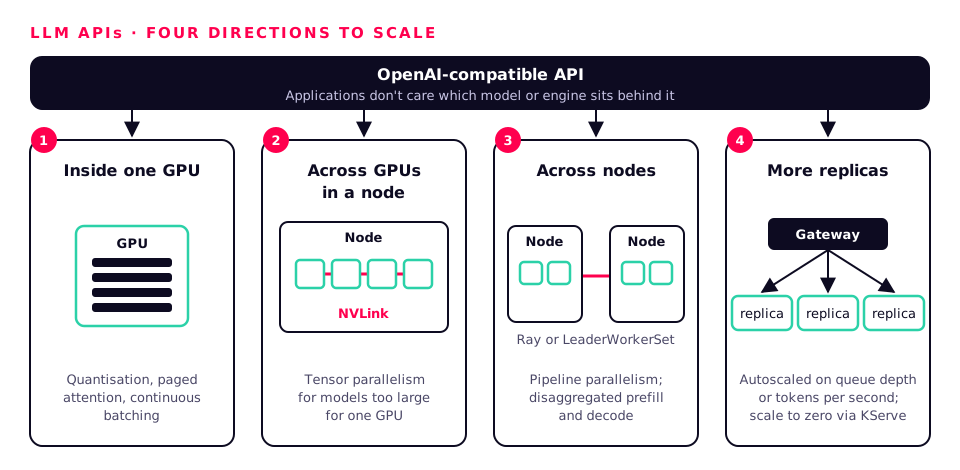
- 1
Inside one GPU
Quantisation (FP8, NVFP4 on Blackwell, AWQ), paged attention and continuous batching in vLLM, SGLang or TensorRT-LLM fit more users onto every GPU.
- 2
Across GPUs in a node
Tensor parallelism over NVLink serves models too large for one GPU, with the lowest latency.
- 3
Across nodes
Pipeline parallelism with Ray or Kubernetes LeaderWorkerSet for the largest models, and disaggregated prefill and decode (NVIDIA Dynamo, llm-d) at cluster scale.
- 4
More replicas
Horizontal scaling behind a gateway, autoscaled on queue depth or tokens per second with KEDA or the HPA, with KV-cache-aware routing and scale to zero via KServe.
Engines we deploy: vLLM, SGLang, TensorRT-LLM with Triton Inference Server, NVIDIA NIM, and Ollama or llama.cpp for desk-side and edge systems. Many LoRA adapters can share one base model on the same GPUs.
CI/CD for LLMs, agents and data pipelines
AI changes more often than ordinary software: new model versions, new prompts, new data. We give each of the three its own pipeline, with the same discipline: everything versioned, tested, signed and promoted through rings.
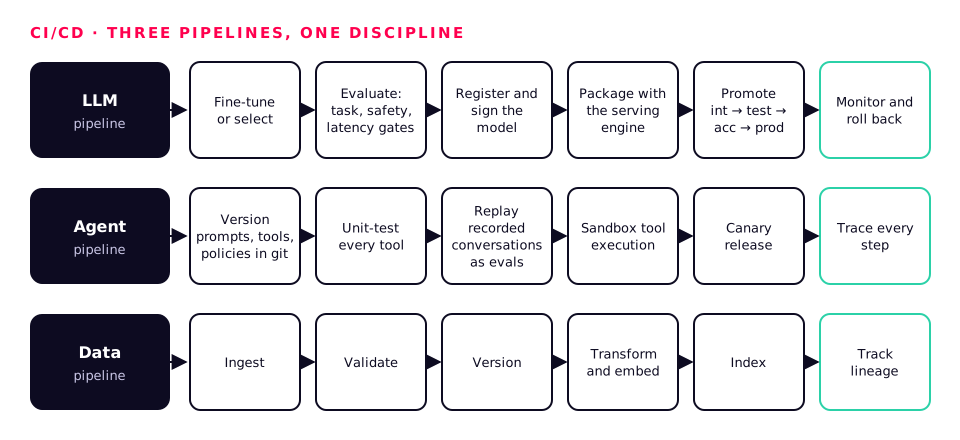
LLM pipeline
- Fine-tune or select
- Evaluate against task, safety and latency gates
- Register and sign the model
- Package with the serving engine
- Promote int → test → acc → prod
- Monitor and roll back
Kubeflow or Ray for training, MLflow registry, cosign signatures, Argo CD for GitOps, and Ring Promoter for health-checked, ring-by-ring releases.
Agent pipeline
- Version prompts, tools and policies in git
- Unit-test every tool
- Replay recorded conversations as evals
- Sandbox tool execution
- Canary release
- Trace every step
Containerised tool sandboxes, evaluation suites in CI, OpenTelemetry tracing, cost and rate budgets per agent.
Data pipeline
- Ingest
- Validate
- Version
- Transform and embed
- Index
- Track lineage
Airflow, Dagster or Argo Workflows; Great Expectations for validation; lakeFS or DVC for versions; Spark or Ray for scale; pgvector, Qdrant or Milvus for retrieval; OpenLineage for lineage.
CI runs on self-hosted runners inside your network, including GPU runners for evaluation, so models and data never leave it.
How we secure Linux for AI
An AI server holds your most valuable data and some of your most expensive hardware. We secure it in layers, so that no single mistake exposes either.
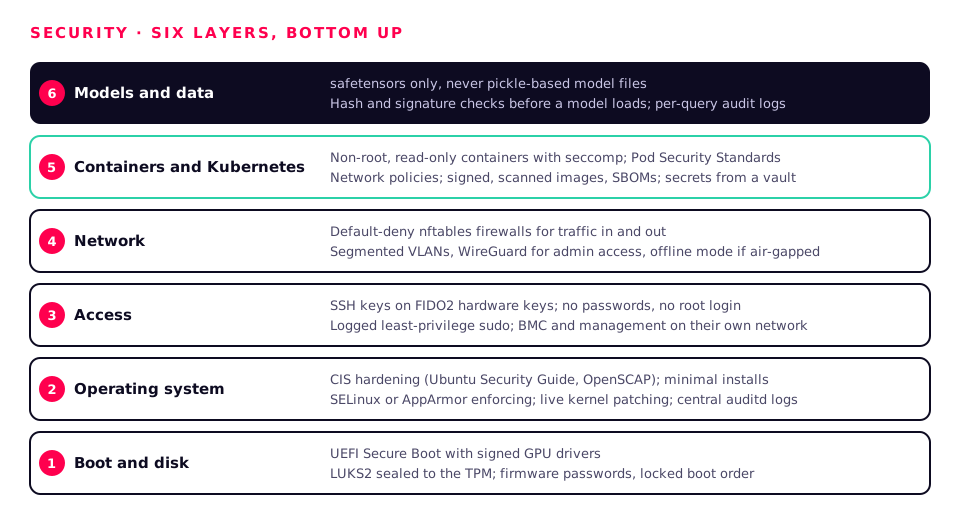
01
Boot and disk
- UEFI Secure Boot with signed GPU drivers
- Full-disk encryption (LUKS2) sealed to the TPM, with unattended restart
- Firmware passwords and locked boot order
02
Operating system
- CIS benchmark hardening (Ubuntu Security Guide, OpenSCAP)
- SELinux or AppArmor enforcing
- Minimal installs and live kernel patching
- auditd logging to a central store
03
Access
- SSH keys held on FIDO2 hardware keys, no passwords, no root login
- Least-privilege sudo with logging
- BMC and management on their own network
04
नेटवर्क
- Default-deny firewalls (nftables) for traffic in and out
- Segmented VLANs and WireGuard for admin access
- Fully offline mode for air-gapped sites
05
Containers and Kubernetes
- Non-root, read-only containers with seccomp profiles
- Pod Security Standards and network policies
- Signed images, vulnerability scans and SBOMs
- Secrets from a vault, never in images or git
06
Models and data
- safetensors only, never pickle-based model files
- Hash and signature checks before a model loads
- Per-query audit logs and matter- or tenant-level access
Supported by the Workstation team
Pick the distribution that suits your organisation and we deliver it ready for AI work, then keep it that way.
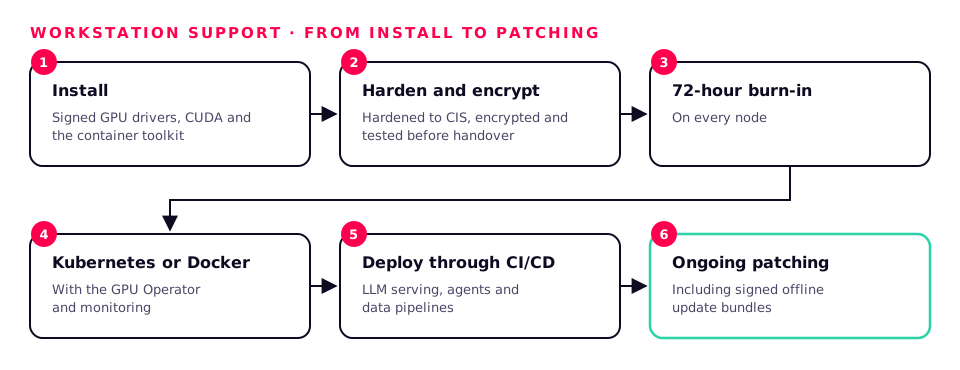
- Installed with signed GPU drivers, CUDA and the container toolkit
- Hardened to CIS, encrypted and tested before handover
- 72-hour burn-in on every node
- Kubernetes or Docker set up, with the GPU Operator and monitoring
- LLM serving, agents and data pipelines deployed through CI/CD
- Ongoing patching, including signed offline update bundles
Logos are trademarks of their respective owners and are used only to identify the products we support. Debian, Rocky Linux and AlmaLinux logos are used under CC BY-SA licences from Wikimedia Commons.